Who it's for

Built for the people who run a contracting company.

Small and mid-size contracting and fit-out companies — 20 to 500 staff — that run jobs today on Excel, WhatsApp and paper. Each role gets its own work, its own start page and clear approvals.

General Manager

Owner or GM of the company

  • Sees budget against actual for every project on the executive view
  • Gives the final approval on quotations and orders above the threshold
  • Knows the cash position and what is waiting on whom
  • Asks the AI assistant instead of waiting for a report

SCREENS Executive view · Approvals · AI assistant · Reports
Operations Manager

Runs all projects day to day

  • Follows every project’s progress, orders and site sheets in one list
  • Spots late deliveries and stuck approvals early
  • Moves people and equipment between jobs
  • Reviews requests before they reach the GM

SCREENS Dashboard · Projects · Delivery follow-up · Equipment availability

Project Manager

Responsible for one or more jobs

  • Runs the project page: contract, BOQ, budget, variations, team
  • Approves material requests and orders for the project
  • Measures work and prepares the client certificate
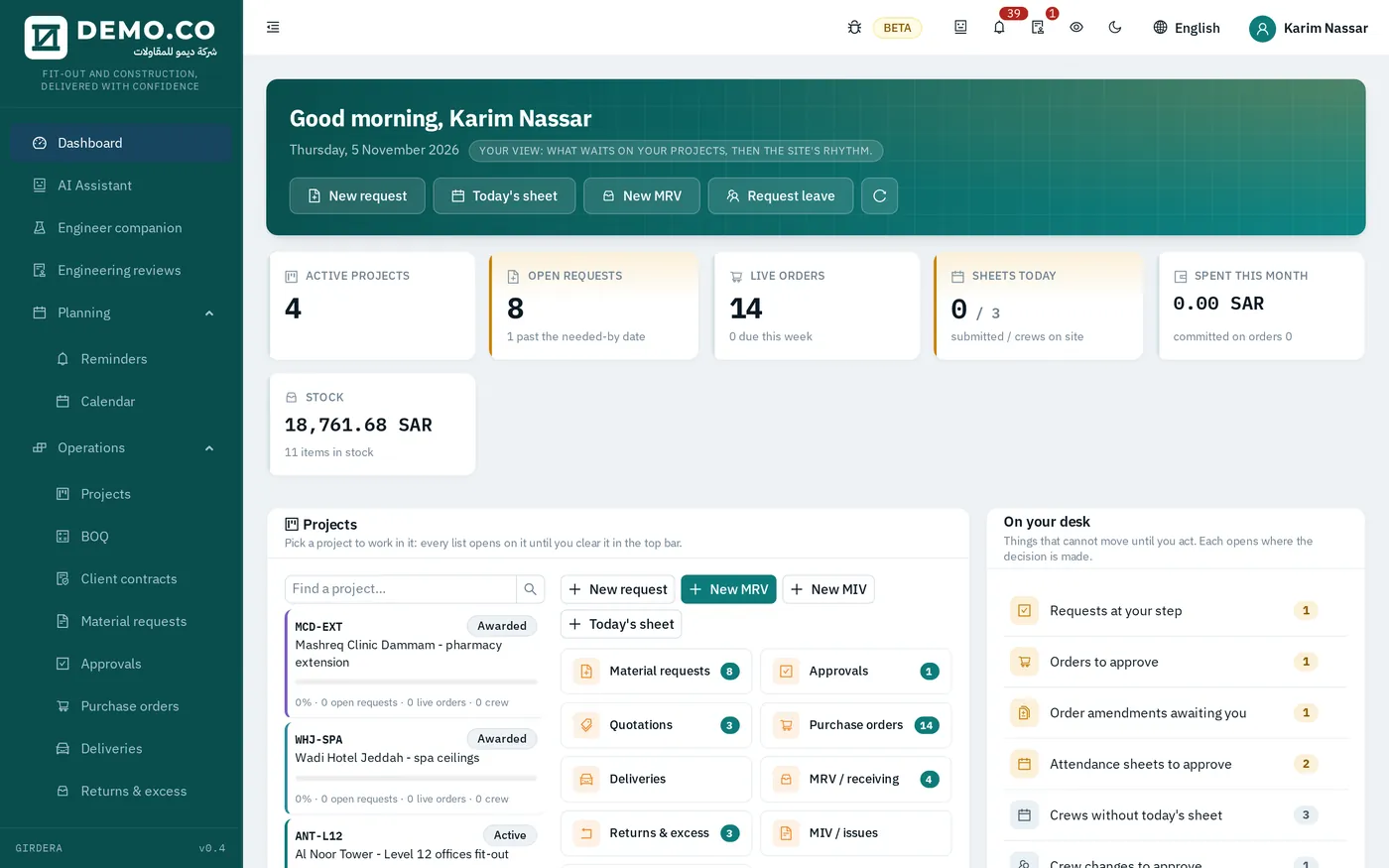
  • Starts the day on a page built around their own projects

SCREENS Start page · Project · BOQ · Variations · Certificates

Cost Controller

Guards the budget

  • Owns the cost codes and sets each project’s budget
  • Checks every request against what is left on its code
  • Sees committed, actual and remaining per code at any time
  • Prepares quotations from cost build-ups

SCREENS Cost codes · Budget · Approvals · Client quotations

Procurement

Buyers and procurement officers

  • Collects and compares supplier quotations for each request
  • Prepares purchase orders and sends them to the vendor as PDF
  • Raises numbered amendments when quantities or prices change
  • Follows deliveries until the order is closed

SCREENS Supplier quotations · Purchase orders · Amendments · Delivery follow-up

Accountant

Finance team

  • Issues client certificates with retention and advance recovery
  • Matches vendor bills to orders and receipts, and records payments
  • Prepares the VAT return from the documents themselves
  • Closes the month

SCREENS Client certificates · Vendor invoices · Payments · Journal

HR

HR and administration

  • Keeps each employee’s file, Iqama and papers, with expiry reminders
  • Handles leave, air tickets and exit re-entry
  • Runs payroll and GOSI, and end-of-service settlements
  • Recruits, from vacancy to new employee

SCREENS Employees · Expiring papers · Leave · Payroll · Recruitment

Site & stores

Site supervisors, engineers and storekeepers

  • Supervisors record the daily attendance sheet for each crew
  • Engineers raise material requests from the BOQ
  • Storekeepers receive against the delivery note and issue to site
  • Everything works on a phone, in Arabic or English

SCREENS Attendance · Material requests · Receiving · Material issues · Returns

Equipment

Equipment and plant coordinators

  • Allocates tools and machines to projects on a timeline
  • Charges day rates to the job that holds the item
  • Plans maintenance and records depreciation
  • Answers equipment requests from the sites

SCREENS Tools and machines · Availability · Requests · Maintenance · Depreciation

Start page

Every morning starts with what is waiting on you.

When a project manager signs in, the start page shows their projects, open requests, orders on the way, today’s sheets and the decisions that cannot move without them.

Start page
Project manager start page with projects, open requests, live orders and items waiting on the desk

See your own job run through GIRDERA.

Book a demo and we will walk a real contracting job through the system with you — quotation, purchase order, site sheet, certificate.